Agents
Specialized Copilot personas that focus on distinct workflows or tools, ready for Copilot coding agent and VS Code sessions.
Agents guideCopilot AgentOps
Accelerator for GitHub Copilot
Documentation
Copilot AgentOps is a curated accelerator for GitHub Copilot. It combines a reusable GitHub repository of instructions, prompts, agents, skills, hooks, and collections with an MCP server that makes discovery available directly inside VS Code.
What Is Inside
Specialized Copilot personas that focus on distinct workflows or tools, ready for Copilot coding agent and VS Code sessions.
Agents guideTask-specific prompts designed for analysis, generation, and acceleration across SDLC stages.
Prompts guideCoding standards and best practices that apply automatically to matching files and repositories.
Instructions guideAutomated workflows triggered by events during Copilot coding agent sessions.
Hooks guideBundled resources and instructions that deliver specialized AI capabilities for repeatable tasks.
Skills guideCurated bundles of prompts and instructions plus practical recipes you can paste into workflows immediately.
Repository Structure
copilot-agentops/
├── prompts/          # Task-specific prompts (.prompt.md)
├── instructions/     # Coding standards and best practices (.instructions.md)
├── agents/           # AI personas and specialized modes (.agent.md)
├── collections/      # Curated collections of related items (.collection.yml)
├── hooks/            # Event-driven automation for Copilot coding agent
├── skills/           # Bundled capabilities and resources
├── cookbook/         # Practical recipes and examples
├── plugins/          # Installable plugins generated from collections
└── scripts/          # Utility scripts for maintenance
Install MCP Server
In VS Code, open the Command Palette and choose MCP: Open User Configuration to open your mcp.json file.
Add the following block inside the top-level servers object.
{
  "servers": {
    "copilot-agentops": {
      "command": "docker",
      "args": ["run", "-i", "--rm", "ajilantony/copilot-agentops:latest"]
    }
  }
}Click Start in the MCP panel to pull the Docker image and run the server locally. You will see the available tools and prompts listed in VS Code.
Prerequisite: Docker must be installed and running to launch the MCP server.
Quick Start
After updating your mcp.json, open the MCP panel and confirm the Copilot AgentOps server appears in the list.
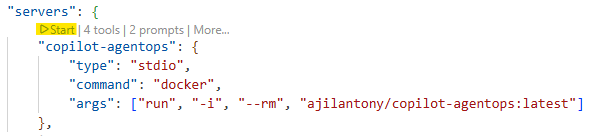
Click Start to pull the Docker image. Once running, the MCP panel lists the available tools and prompts.

Use the Accelerator
Choose a custom agent when assigning a GitHub issue to Copilot coding agent, or activate it inside VS Code sessions.
Use the slash command in Copilot Chat to access prompts.
/copilot-agentops create-readmeInstructions automatically apply to files that match their patterns, keeping standards consistent across repos.
Use hooks to automate workflows on sessionStart, sessionEnd, and userPromptSubmitted events.
Explore the full documentation in the repository for step-by-step guidance on each asset type.